
How to Make an iPhone Kupi Dance AI Video From Your Photo
By Hotel Lobby AI · Published October 29, 2026
Turn a photo into the folding-phone reveal and hotel-room dance. On Hotel Lobby AI, you upload one photo, select a quality and confirm generation. The template supplies the dance reference, so you can follow these steps without preparing a prompt.
Below is an actual result generated on this website, paired with its original selfie. Use it to see the effect before making your own.
Generated on Hotel Lobby AI: the photo and result
A selfie. The full dance.
GENERATED ON HOTEL LOBBY AI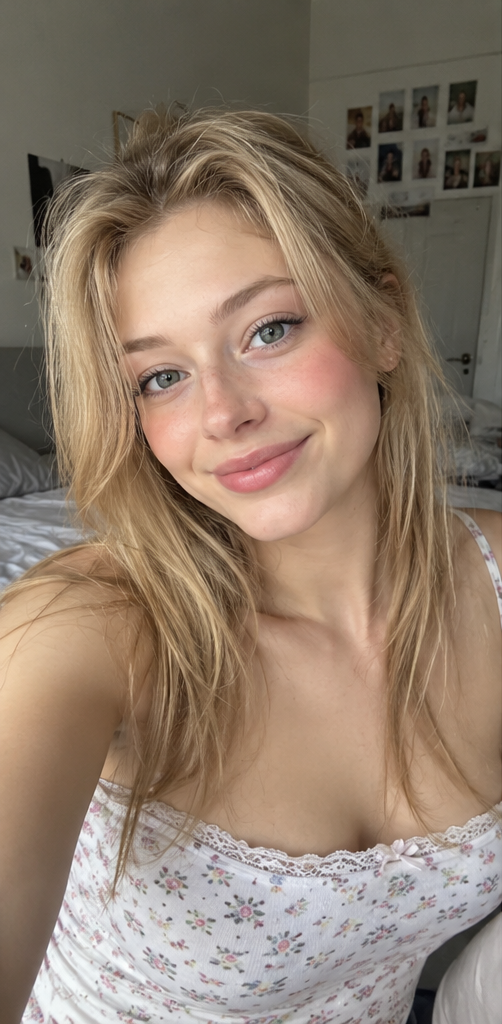
The photo used
for this test
Generated on Hotel Lobby AI from the original photo shown here. Results vary with each photo.
1. Choose one clear photo
Use a photo of one adult who has agreed to appear. Keep the face visible and well lit. A waist-up or full-body photo gives the model more information for the dance. JPG, PNG and WebP files up to 10 MB are supported.
The example below starts from a close-up selfie. It shows one successful result; a photo with more of the body visible is still a useful starting point. Avoid group photos, strong filters and faces covered by sunglasses or a hand.
2. Open the generator and sign in
Open the iPhone Kupi Dance AI generator on Hotel Lobby AI and sign in. The form uses one photo. You do not need to upload your own dance video, write a prompt or record yourself dancing: the template already supplies a motion reference.
Choose your photo and confirm that you have permission to use the person's image. Check the upload preview before continuing.
Open the generator3. Choose your video quality
The template creates a 15-second vertical video in 9:16. Choose an available resolution in Video mode. The form updates the credit amount when you change quality; use that quote as the final price before submitting.
All purchased credits share one balance and can be used across the available resolutions. A higher resolution uses more credits. Higher resolution alone does not guarantee better facial consistency or hand movement.
4. Review your credits and confirm generation
Click Generate My Dance Video. If you need more credits, follow the purchase option and return to the generator after payment. Buying credits does not start a video by itself.
Check the quality, duration and required credits in the confirmation dialog, then confirm. Photo checks run before generation. Technical generation failures release the held credits; a delivered result blocked by output moderation still consumes generation credits.
5. Follow the task, then download the MP4
Wait for the task status in the result panel. Processing time depends on the provider and queue, so follow the actual progress rather than a promised countdown. If the status is uncertain, let the existing task recover instead of creating another request.
When the video is ready, watch the entire clip, including the wide shot, the phone unfold and the toss. Use Download video to save the MP4. Downloading the same completed result does not charge you again.
How many credits does a 15-second dance cost?
| Model | Resolution | Duration | Credits per video |
|---|---|---|---|
| Fast | 480p | 15 seconds | 450 |
| Fast | 720p | 15 seconds | 900 |
| HD | 1080p | 15 seconds | 3,000 |
| Seedance 2.0 Mini | 480p | 15 seconds | 450 |
| Seedance 2.0 Mini | 720p | 15 seconds | 900 |
Check the quote in the generator before confirming. For example, 1,000 credits cover one 720p dance at 900 credits, while a 1080p dance requires 3,000 credits. Buying a pack does not automatically create a video.
View credit packs and plansCheck the result before posting
Watch the full video rather than judging only its first frame. Check that the face remains recognizable when the dancer moves away from the camera. Look at both hands and the phone during the unfold and catch. If you want to try another photo, return to the generator and review the new quote before confirming another generation.
This template requests silent output. You can add a soundtrack afterward in an editor or your publishing platform.
Frequently asked questions
Do I need a prompt or a dance reference video?
No. This generator provides the prompt and preset dance reference. You upload one photo and choose an available quality.
Was the example generated on this website?
Yes. The site owner confirmed that the paired selfie and dance video shown here were generated on Hotel Lobby AI. The other clips on the generator page are labeled as references.
Does the video include the original song?
This template requests a silent video, and the example here is silent. Add music in your publishing platform or editor if you want a soundtrack.
Will the face, clothes and dance match perfectly?
The model uses your photo for the person and a reference video for the performance. Results vary. Watch for face changes, extra fingers and distorted phone edges before sharing.
Why can I not generate right now?
Check that you are signed in, the photo has uploaded, the permission box is checked and you have enough credits for the selected quality. If the generator is temporarily unavailable, wait until it becomes available before trying again.
Make your own iPhone Kupi dance
Choose a clear photo, check the credit quote and create your own version of the dance.
Create my iPhone Kupi dance